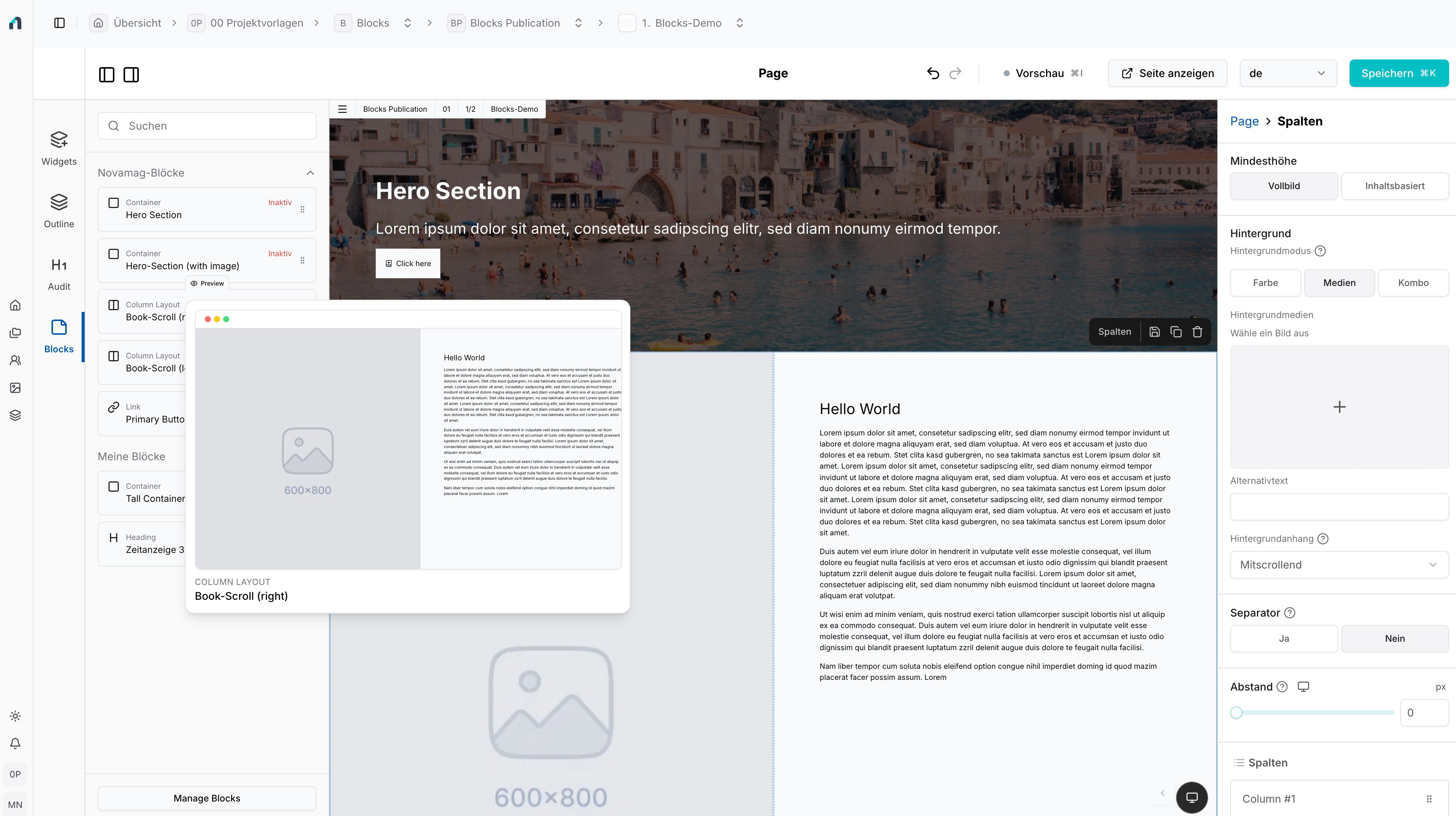
Blocks: Simply reuse design blocks

Novamag Functions

Save individual widgets or complete layout areas and use them again in other pages and projects using drag-and-drop.

Blocks: Design elaborate layouts once and reuse them everywhere

With blocks, you can save particularly elaborately designed and responsive content areas in the Novamag editor so that you can reuse them at any time. This allows you to save individual widgets or entire groups of widgets as reusable building blocks and use them again in other pages or projects.

This saves time, ensures consistent designs and makes high-quality layouts easy to use in a team.

Save a widget or entire areas

A block can consist of a single widget or a complete group of widgets. This allows you to save not only small elements, but also complex sections of content with layout, structure and design.

For example

  • elaborately designed hero areas
  • Teaser sections
  • Call-to-action sections
  • Product or content modules
  • interactive layout areas
  • recurring page elements

Once saved, the block is ready for reuse at any time.

Reusable across pages and projects

Saved blocks can not only be used on the same page or in the same magazine, but can also be reused across projects. This is particularly helpful when teams work with recurring layouts or want to make certain design blocks available to several employees for other projects.

This turns an elaborately created area into a flexible, scalable building block for the entire content production.

Separate section in the editor for quick access

All saved blocks are bundled in a separate section in the editor. They can be quickly found, selected and used directly. This simplifies the editing and design process and makes reusable content immediately available.

Instead of rebuilding layouts again and again, you can simply use existing blocks.

Select with preview and use with drag-and-drop

Each saved block has a preview. This means you can immediately see how the respective area is designed and which block is the right one for the next use.

The desired block can then simply be dragged and dropped to the appropriate place on the page. This makes reuse not only efficient, but also particularly intuitive.

Consistency in design, efficiency in the team

Blocks help to implement visual standards consistently across different pages and projects. At the same time, they make it possible to share high-quality layouts within the team and make them usable together.

The result: less manual effort, faster production processes and a consistent, professional appearance.

Make more out of good ideas

Blocks allow you to transform strong layouts into reusable building blocks. What has been designed once can be used as often as you like, shared within the team and flexibly integrated into new contexts.

This allows you to work more creatively, faster and much more efficiently.

State-of-the-art technologies for effective communication

Novamag combines design, functionality and marketing and offers you a range of state-of-the-art technologies to effectively share your content with your target group.

Editor

The heart of Novamag: Create captivating and interactive reading experiences effortlessly with our intuitive visual editor.

Read more

Measurability and analysis

Gain valuable insights and find out what really interests your readers. Increase the relevance of your digital magazine by proactively responding to user behavior.

Read more

Display Ads

Easily place ads in your digital magazine with our versatile ad widgets.

Read more

Multi language

Expand your readership and simply offer your digital magazine in different languages. Create additional languages alongside your standard language in no time.

Read more

Cookie Manager

Read more

Integrate external content easily and in compliance with the GDPR - with the central cookie manager for all third-party providers.

Project templates

Prefabricated, professionally designed layouts that you can quickly adapt to your CI and fill with your own content.

Read more

Artificial intelligence

Use AI for translations, automatic content creation and the transformation of PDFs into interactive magazines.

Read more

Animations

Use animations to set widgets and layouts in motion and create modern, lively magazines. Simply activate them in the editor - without code and fully responsive.

Read more

Project styles

With project styles, you define colours, typography and navigation centrally for your entire project - perfectly coordinated and consistent on every device.

Read more

Blocks

Save widgets or entire layout areas as blocks and reuse them across pages and projects. You can use them quickly and easily in the editor via preview and drag-and-drop.

Read more

Products

Showcase your products in style and inspire customers with a digital shopping experience.

Read more

Paywall

Monetize your digital magazine and offer your readers exclusive content with added value.

Read more

Responsive presentation

Automatically optimised for display on all devices! Whether smartphone or tablet - your digital magazine adapts to different screen sizes all by itself.

Read more

Intelligent search

Find content across all editions. The AI-supported search understands content and delivers relevant results instead of simple hit lists.

Read more

Multimedia

Get your readers' attention by integrating different kinds of media such as videos, graphics, animations and audio into your digital magazine.

Read more

Integrations

Increase user interaction in your digital magazine with individual widgets and achieve a memorable and unique reading experience.

Read more

PDF Export

The best of both worlds – your digital magazine, automatically exported as a print-ready PDF.

Read more

Magazine character

Maintain the valued magazine character of your digital magazine. With Novamag, you can add, edit and customize regularly published issues at any time. By using content pages, you can create connections within the topics and easily present even complex topics.

Read more

Social Media

Increase your reach and enable direct interaction with your readers by sharing individual pages on social networks. Increase the visibility of other marketing channels and integrate social media posts and YouTube contributions directly into your digital magazine.

Read more

Safety First

Your data is in safe hands! Novamag stores data exclusively on German servers and processes data in compliance with the GDPR. Novamag offers daily backups, secure connections, password protection for your digital magazine and much more.

Read more
Brochure

Create. Inspire. Engage.

Start your free trial now

Experience how simple it is to design stunning digital magazines with Novamag — no prior knowledge needed. Start your free trial today and captivate your readers with interactive content.

Get started now

Create your individual digital magazines. Quick and easy with Novamag.

Deutsch
LoginGet started now